ad. I’ve written before about how we cut out our son’s screen time completely, as it makes him dysregulated. We have been screen-free for almost two years! Although my child doesn’t watch TV, I do feel bad about him missing out on some of his favourite characters and stories. Audio players like the Yoto Player let children listen to stories and learn new things without the use of a screen.
If you’re wondering what a Yoto Player is and whether it’s worth the money, you’re in the right place. This Yoto Box review covers everything from the Yoto Player itself to Yoto Player cards, the Yoto Player app, and honest Yoto Player reviews from our family’s experience. We have used the Tonie Box screen-free audio player for the past couple of years, but my son has lost interest in that now, as it’s better for younger children, and he’s almost five.
So here’s my full Yoto Player review after using it with him for several months – covering the Yoto Player itself, the cards, the app, and whether it’s actually worth the money. This Yoto Player review covers our real experience using it for months – the good, the bad, and whether the Yoto Player is actually worth buying.
(Some people refer to Yoto Player as the Yoto Box, but its official name is Yoto Player!)
- What Is A Yoto Player?
- Yoto Player: The Original Yoto Player
- Yoto Mini Player
- Yoto Cards: How They Work
- Yoto Features & Accessories
- Make Bedtime Easier With Yoto Player
- Yoto Player vs Toniebox
- What Other Parents Think: Yoto Player Reviews
- Final Yoto Player Review: Is It Worth It?
- Frequently Asked Questions About Yoto Player
What Is A Yoto Player?
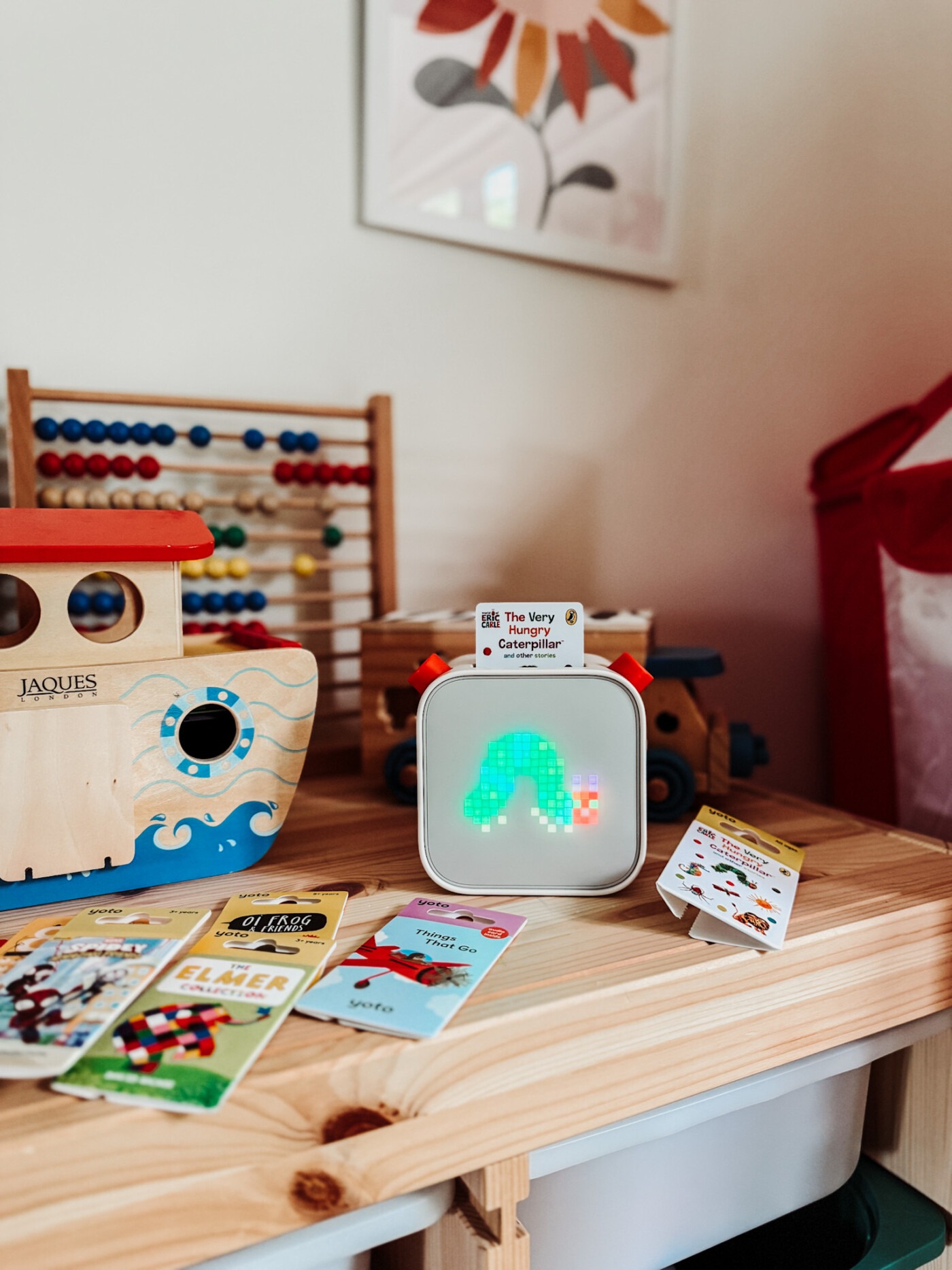
For anyone asking “what is a Yoto Box?”—it’s a screen-free audio player designed specifically for children. The Yoto Player (officially called the Yoto Player or Yoto Player) is an innovative device that plays audiobooks, music, podcasts, and educational content without any screens involved.
Unlike tablets or phones, the Yoto Player uses physical Yoto Player cards that children insert into the top of the device. Each Yoto Player card contains different audio content—whether that’s a story, album, or educational material. This tactile approach helps young children understand cause and effect whilst keeping them away from addictive screens.
The Yoto Player comes in two versions: the original Yoto Player and the smaller Yoto Mini Player. Both work with the same YotoBox cards and are controlled via the Yoto Player app on your phone. The devices are designed to be completely child-friendly and independent, meaning kids can operate them without adult help once you’ve set everything up.
In this Yoto Player review, I’ll walk you through everything we’ve learned after using the Yoto Player for several months with our nearly five-year-old.
If you’re wondering “what is a Yoto Player and how does it work?”, the simple answer is: it’s a screen-free audio player that children control using physical cards, making it perfect for families who want to reduce screen time whilst still providing entertainment and education.
Yoto Player: The Original Yoto Player
The Yoto Player works with physical Yoto Player cards, allowing kids to play audiobooks, music albums, and free podcasts by simply popping a card into the top of the player. It’s simple to use, making it great for both small children and older kids to use independently.
The sound quality of the Yoto Box is clear, and you can control the maximum volume in the Yoto Box app settings, which is great if your child is trying to play it at full blast at bedtime (I’ve been there!). There’s also a headphone jack, in case your child wants quiet time or to use it on road trips. With up to 24 hours of battery life per charge, the YotoBox will last a long time, whether used on the go or at home.
There’s also a night light function on the Yoto Box that gives a soft glow at bedtime. You can change the colour of the light in the Yoto Box app.
The YotoBox can be used as both a bedside clock and an alarm clock, allowing young children to be woken up by a variety of sounds. I have ours set to Yoto Sleep Radio, so it wakes my son to gentle music at 7 am on school days before I go and get him. It’s set from Monday to Friday.
Yoto Mini Player
There’s also the Yoto Mini Player – a smaller YotoBox that is great for on-the-go use. It has up to 14 hours of battery life, so it is great for long car rides as well as daily use.
The Yoto Mini works with the same YotoBox cards as the regular Yoto Player, and it connects to the same Yoto Box app. The main difference is its compact size and slightly shorter battery life. If you’re looking for a Yoto Box specifically for travel, the Mini is perfect. However, for home use, the original Yoto Player has more features.
Both versions of the YotoBox are included in most Yoto Box reviews, and parents generally love having the option of a portable version.
Yoto Cards: How They Work
The heart of the Yoto Box system is the YotoBox cards. These are the physical cards that you insert into the top of the Yoto Player to play different content.
What Are Yoto Player Cards?
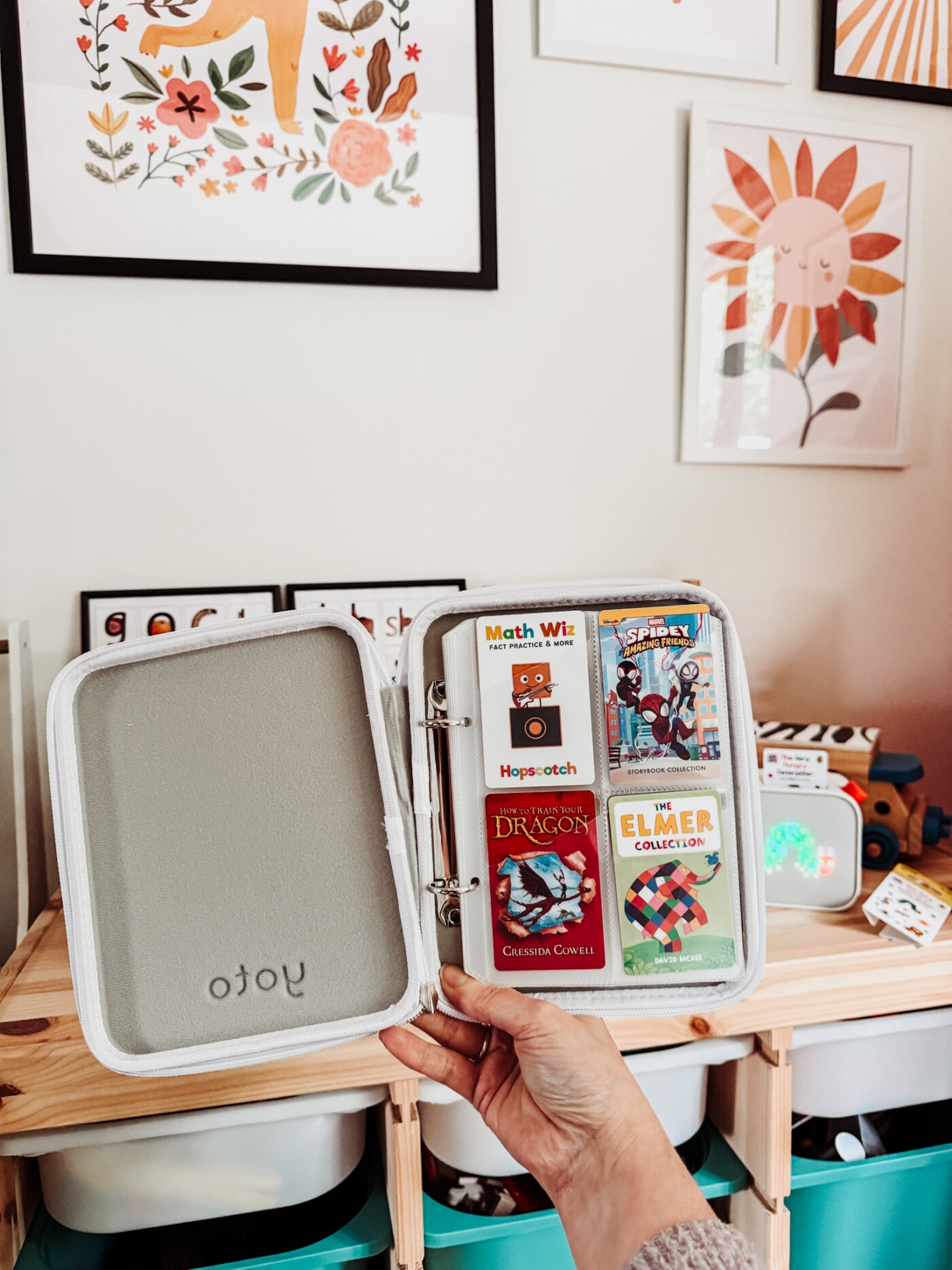
Yoto Player cards are small, rectangular cards (about the size of a credit card) with beautiful artwork on the front. Each card contains a specific piece of audio content—a story, album, podcast series, or educational material. When you insert a Yoto Player card into the Yoto Player, it immediately begins playing that content.
The selection of Yoto Player cards is impressive. There are hundreds of options available, including:
Podcasts – Age-appropriate podcasts on various topics
Popular children’s books – The Very Hungry Caterpillar, Gruffalo, Julia Donaldson stories
Classic stories – Roald Dahl, Enid Blyton, fairy tales
Character content – Spider-Man, Disney stories, Peppa Pig
Educational content – Language learning, science, history
Music – Children’s songs, classical music, soundtracks
Sleep and mindfulness content – Meditation, white noise, calming stories
How Much Do YotoBox Cards Cost?
YotoBox cards typically cost between £7-15 (as of April 2026), depending on the length and type of content. This is generally cheaper than Tonie figures, which we used previously. You can often find bundles or sales that make YotoBox cards even more affordable.
Blank YotoBox Cards
One of the best features is the blank YotoBox cards. You can use blank cards to upload your own content or favourite stories, so you can add your music, recordings, or digital downloads without extra cost every time. This is brilliant for:
- Recording yourself reading stories
- Adding audiobooks you already own digitally
- Creating personalised messages from family members
- Adding music from your own collection
- Blank YotoBox cards are reusable
The blank YotoBox cards are reusable too—you can wipe them and add new content whenever you want through the Yoto Box app.
Storing Yotobox Cards
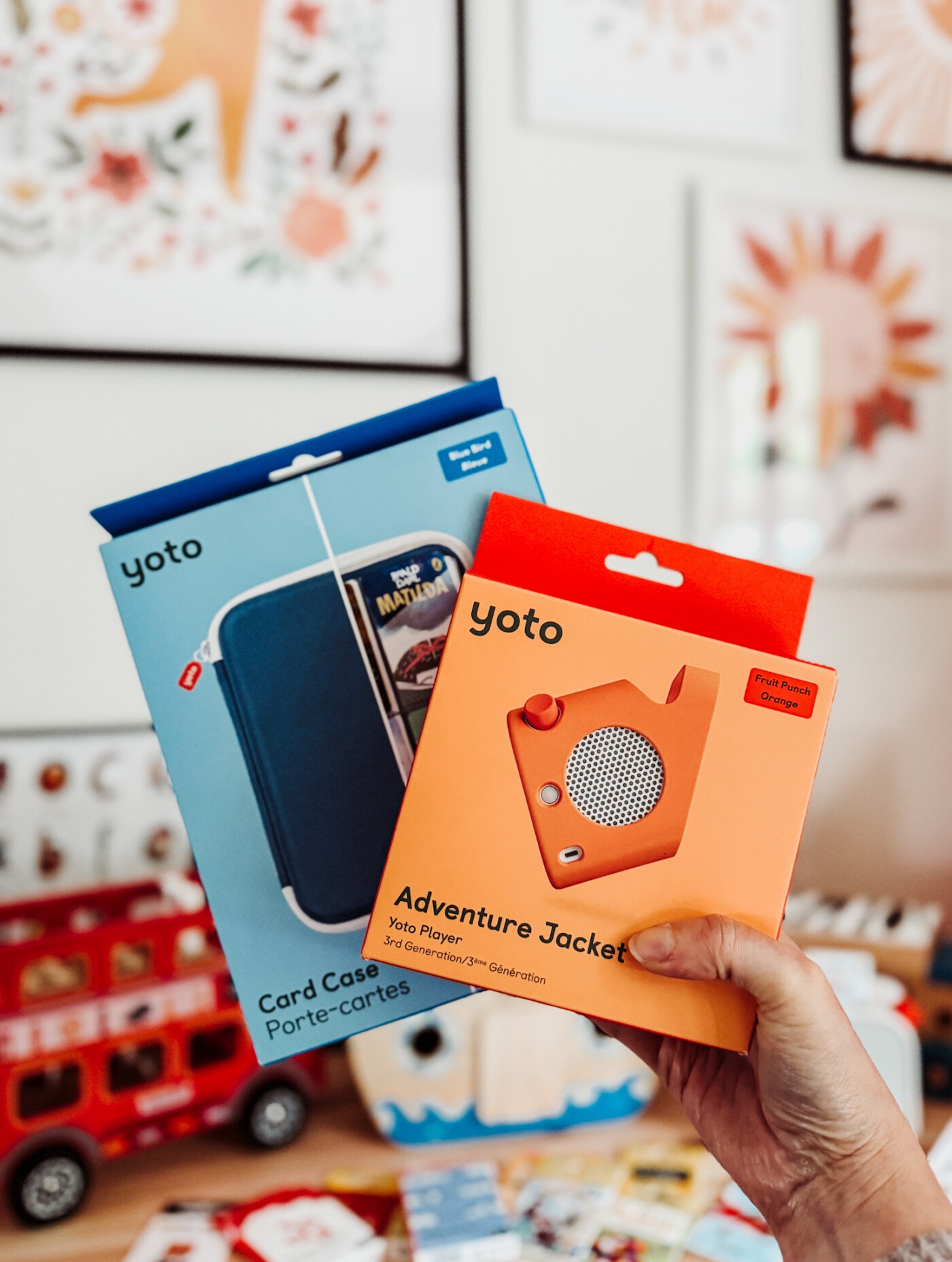
Don’t forget to get yourself a card case to keep your child’s library of YotoBox cards safe. The case holds 64 cards and makes it easy to flick through and select which audiobook you want to listen to next. Keeping YotoBox cards organised means your child can independently choose their content.

The Yoto Player App: Complete Guide
The Yoto Player app is how you control your Yoto Player. Understanding the YotoBox app is key to getting the most from your device. Here’s everything you need to know about the Yoto Box app and how to use it.
Setting Up the Yoto Player App
As a parent, you need to download the Yoto Player app to manage the Yoto Player. The app is available for both iOS and Android devices. Setup is straightforward:
- Download the Yoto Box app
- Create an account
- Connect your Yoto Player to WiFi through the app
- Start customising settings
What Can You Do in the Yoto PlayerApp?
Through the Yoto Box app, you can:
- Change settings – Adjust the alarm, maximum volume, and nightlight colour
- Create custom YotoBox cards – Upload your own content to blank cards
- Access free content – Browse the library of free podcasts and radio
- Manage your library – See all your YotoBox cards and downloaded content
- Control playback remotely – Play content from your phone when out and about
- Set up Bluetooth – Connect to other devices
Free Content in the Yoto Player App
The Yoto Box app gives you access to loads of free content:
- Yoto Daily – A free daily podcast that updates every day
- Yoto Radio – Plays all day and transitions into bedtime music at night
- Yoto Sleep Radio – Gentle music and sounds for sleep time
- Seasonal content – Special free content for holidays and events
Once you’ve downloaded content through the Yoto Box app to your Yoto Player, it will appear in your library on your phone, and you can play it on your phone too. So if you are out and about and your child wants to listen to something, you can! You could even put them on in the car using your car’s Bluetooth.
Using the Yoto Player App as a Bluetooth Speaker
You can connect your phone to the Yoto Player app and use the YotoBox as a Bluetooth speaker. This is something else that works great when travelling, as you can use it to play music while on holiday.
The Yoto Player app is intuitive and easy to navigate. Most parents find it simple to use, even if they’re not particularly tech-savvy. The app is a crucial part of what makes the Yoto Box work so well.

Yoto Features & Accessories
Beyond the basic Yoto Player and YotoBox cards, there are several features and accessories worth knowing about.
Yoto Club
You can join the Yoto Club through the Yoto Box app and get digital access to the full library, plus other perks such as free credits to spend on Yoto Player cards. This subscription gives you unlimited access to stream content without buying individual cards.
The Adventure Jacket
The adventure jacket is a must if you plan on taking the Yoto Player out and about. It gives the Yoto Player a handle so you can easily carry it around, and it also offers protection if it gets dropped. This accessory is particularly useful for the original Yoto Player if you’re taking it on trips.
Headphones
While the Yoto Player has decent built-in speakers, child-safe headphones are great for travel or when siblings need quiet time. The Yoto Player has a standard headphone jack that works with any children’s headphones.
Extra Yoto Player Cards
Building a collection of Yoto Player cards is part of the fun. Many parents buy a few key cards to start with, then add more for birthdays, Christmas, or as treats. The physical nature of Yoto Player cards makes them feel special—like collecting books or toys.
Make Bedtime Easier With Yoto Player
My son has always been a difficult sleeper. We used an audio box to help us transition to going to sleep without me there. I used to have to lie with him until he fell asleep, but we started to listen to the Yoto Box after we read books together, and I was able to start leaving him. Freedom!
My son would go to sleep to normal stories played through the Yoto Player, but there are also sleep sounds available through the Yoto Box app, such as white noise, bedtime stories, or music.
You can turn the Yoto Player into a night light by just putting it face down, too. The soft glow is perfect for children who don’t like complete darkness.

OK to Wake Clock
The YotoBox can also make daytime easier thanks to the OK to wake clock feature in the Yoto app. You can tell the Yoto Player what time morning is, and the clock will switch from a moon to a sun, indicating it’s morning. This is great for early risers who may need encouragement to play in their room for a little while before waking the rest of the family.
The Yoto app also includes an alarm clock feature to wake up sleepier children. I have ours set to wake my son to gentle music at 7 am on school days.
Yoto Player vs Toniebox
Many parents ask whether to choose a Yoto Player or Toniebox. Having used both extensively, here’s my honest comparison:The main difference between Yoto Player and Toniebox is that the Toniebox uses little figurines that go on top of the box and play the story or music. It’s probably easier for very young children who struggle with putting the YotoBox cards in the Yoto Player.
However, there is a much better range of YotoBox cards than Tonie figures. The Yoto Box is more suitable for older children, thanks to the broader range of audio content. As I said, my son is growing out of his Toniebox now.
The extra features on the Yoto Box, like the clock and alarm (controlled through the Yoto Box app), are great for older children. YotoBox cards are also cheaper than Tonie figures.
Although our Toniebox has been great for my son, a YotoBox would be a greater long-term investment just due to the amount of content available. The Yoto Box grows with them, whereas the Toniebox seems more suitable for pre-school children.
In terms of Yoto Box reviews versus Toniebox reviews, both products are well-loved. But for children aged 4+, most Yoto Box reviews suggest it’s the better choice.
What Other Parents Think: Yoto Player Reviews
Reading other Yoto Player reviews helped me decide to make the switch from Toniebox, so I wanted to share what other parents are saying about the YotoBox:
Common Praise in Yoto Box Reviews:
- Children genuinely enjoy using the Yoto Box independently
- The range of YotoBox cards is excellent and growing constantly
- The Yoto Box app is user-friendly and well-designed
- Build quality is solid—many Yoto Box reviews mention devices lasting years
- The clock and alarm features are game-changers for bedtime and wake-up routines
- Blank YotoBox cards are brilliant for adding personal content
- Customer service is responsive and helpful
Common Criticisms in Yoto Box Reviews:
- Initial cost can feel steep compared to screens
- YotoBox cards can add up if you buy lots of them (though cheaper than Tonies)
- Some younger children struggle with inserting the cards at first
- WiFi connection can occasionally be temperamental
Overall, the vast majority of Yoto Box reviews are overwhelmingly positive. Parents appreciate the screen-free nature of the YotoBox, and children love the independence it gives them. These consistent themes across hundreds of Yoto Box reviews suggest the product delivers what it promises for most families.
Final Yoto Player Review: Is It Worth It?
After almost a year of daily use, my verdict on this Yoto Box review is clear: yes, the YotoBox is absolutely worth it, especially if you’re committed to reducing screen time.
What is a Yoto Box worth to your family?
That depends on your priorities. If reducing screen time, fostering independence, and supporting good sleep habits are important to you, the Yoto Box is worth every penny. If you’re happy with screens or don’t mind supervising audio content, it might not be necessary.
Pros of the Yoto Box:
- Genuinely screen-free – No screens, no temptation, just audio
- Independent use – Children can operate it themselves with YotoBox cards
- Excellent content range – Hundreds of YotoBox cards available
- Grows with your child – Suitable from age 3 to 8+
- Great features – Clock, alarm, night light all controlled via the Yoto Box app
- Quality build – Feels durable and well-made
- Blank cards – Add your own content without buying more YotoBox cards
- Educational value – Encourages listening skills and imagination
- Helps with sleep – Bedtime stories and routines via the Yoto Box app
Cons of the Yoto Box:
- Initial cost – £99+ for the player
- YotoBox cards – Ongoing cost, though cheaper than alternatives
- Requires WiFi – For the Yoto Box app setup and updates
- Learning curve – Younger children need help initially
We love the Yoto Player so far! It’s a great next step up from the Toniebox, and we love all the additional features – especially the clock, as my son is becoming obsessed with learning how to tell the time. The Yoto Box app makes controlling everything easy, and the range of YotoBox cards means he never gets bored.
If you’re wondering what is a Yoto Box and whether it’s worth the investment, I hope this Yoto Box review has helped. For families committed to screen-free living, the YotoBox is one of the best tools available. And if you were asking “is Yoto Box real or fake?”—I can confirm it’s very much real and very much worth it!
The combination of the physical YotoBox, the manageable YotoBox cards, and the comprehensive Yoto Box app creates a system that actually works for modern families trying to limit screens. Based on our experience and countless other positive Yoto Box reviews, I’d recommend the YotoBox to any parent looking for quality audio entertainment for their children.
Frequently Asked Questions About Yoto Player
What is a Yoto Player used for?
A Yoto Player is a screen-free audio player for children that plays stories, music, podcasts, and educational content using physical YotoBox cards. It’s used for entertainment, education, bedtime routines, and encouraging independent play without screens.
What age is the Yoto Player suitable for?
The Yoto Box is recommended for children aged 3-8+, though some families start using it earlier. Younger children (under 3) may need help inserting cards initially, whilst older children can operate it completely independently.
Can you use a Yoto Player without WiFi?
Yes, once content is downloaded to your Yoto Player through the Yoto app, you can use it without WiFi. However, you need WiFi for initial setup, downloading new content, and accessing Yoto Radio or Daily.
How much do Yoto cards cost?
YotoBox cards typically cost £7-15 each, depending on the content length and type. Blank YotoBox cards (for uploading your own content) are also available and reusable.
Is the Yoto Player worth the money?
Based on this Yoto Player review and feedback from other parents, yes – the Yoto Box is worth the money for families committed to reducing screen time. The device is well-built, the content library is extensive, and features like the clock and alarm add extra value.
Can adults use the Yoto Player?
Yes! Many adults use their child’s Yoto Player for audiobooks, podcasts, or as a Bluetooth speaker. The Yoto Player app allows you to play content through the Yoto Player from your phone.
Related Posts:
What a great device which can be personalised to your child’s needs and keep them off devices.
What a great little device. Personalisable for your child’s needs and reduces screen time,
This sounds like a great device and I like there’s a variety of cards to put in there for the kids to enjoy!
Lucy | http://www.lucymary.co.uk
Wow!!! Yoto box sounds so cool. Even I feel I want one for myself. Hehehe…
This is such a great comparison. We have a Tonie box, although admittedly, the girls haven’t really used it a lot recently. I still think we’ve got our moneys worth though as they’ve had it for a couple of years now. I really like the blank card idea with Yoto. That’s such a cool addition. I also like how easily the cards can be stored – That’s somethign we struggle with with the Tonie!
Claire.X
http://www.clairemac.co.uk
You know me and my opinion on too much screen time for little ones – but can you believe we still don’t own a Yoto box!? It’s on the Christmas list this year.
Rosie